Spacecraft Configuration
The Spaceflight Dynamics Framework (SDF) uses externally defined spacecraft configurations to initialize the physical, propulsion, control, and simulation parameters of each vehicle.
Spacecraft profiles are defined in JSON configuration files and provide the properties required by the C++ simulation core, including mass properties, inertia, propulsion geometry, fuel tanks, initial state, and controller-relevant parameters.
Spacecraft selection is optional. If the user does not explicitly select a vehicle, the first spacecraft defined in the loaded JSON configuration is automatically used as the default simulation vehicle.
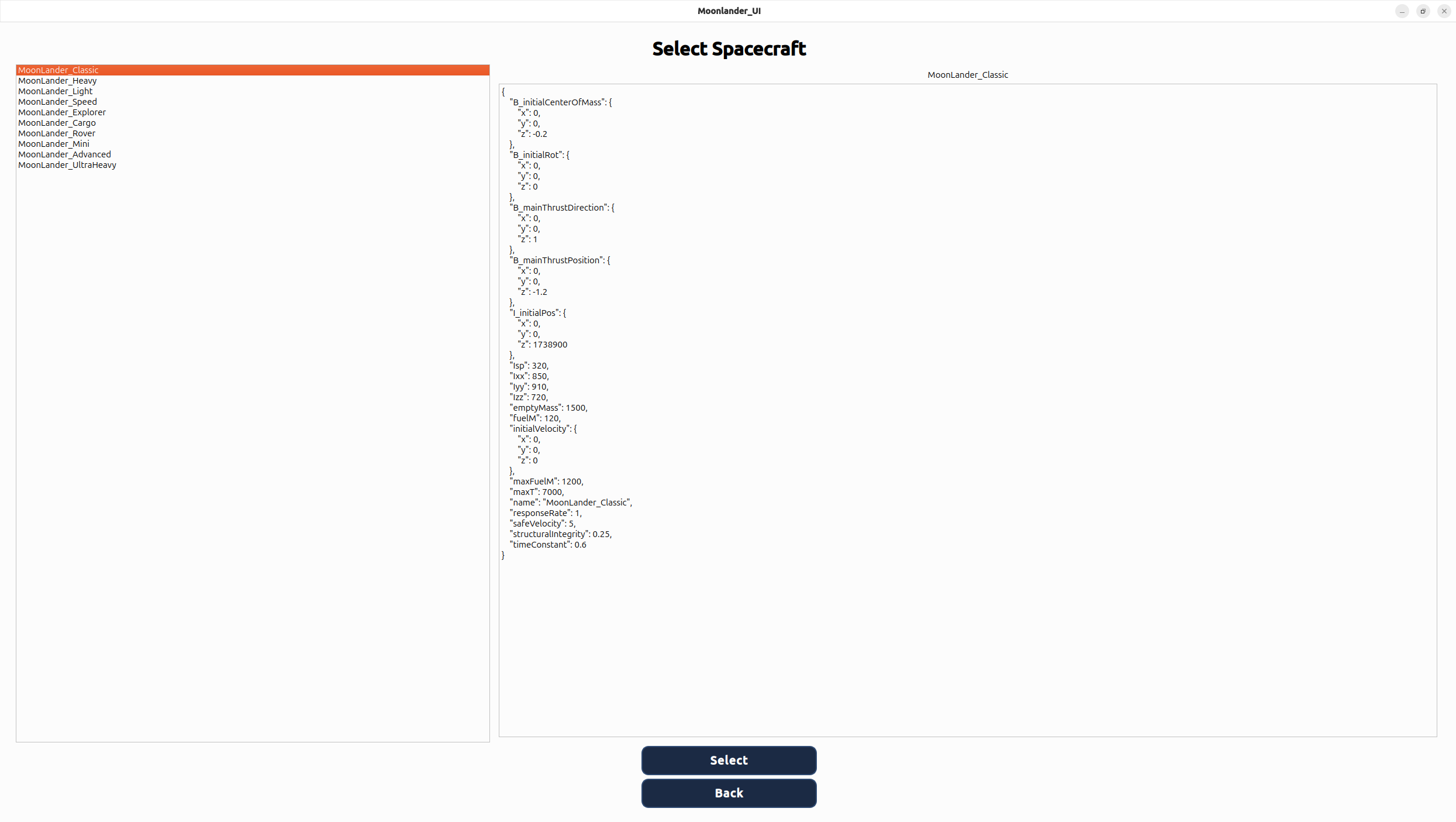
Figure 0 — Spacecraft Selection Interface. The optional selection interface allows the user to override the default spacecraft before entering the cockpit. If no explicit selection is made, the first vehicle defined in the JSON configuration is loaded automatically.
The configuration workflow keeps vehicle definition separate from simulation logic. New spacecraft variants, propulsion layouts, fuel systems, inertia properties, actuator geometries, and initial conditions can therefore be introduced without modifying the core dynamics implementation.
The default-selection behavior ensures that the simulation backend always receives a valid spacecraft configuration while preserving the option to select alternative vehicle profiles explicitly.
Simulation Demonstration
The current demonstration uses a lunar descent scenario to showcase the integrated SDF simulation environment. It combines spacecraft dynamics, propulsion, guidance, control, telemetry, and cockpit visualization in a single real-time simulation workflow.
The demonstration application is built on the same modular backend architecture used by the framework and therefore serves as both a visual application and an integration test environment for new simulation capabilities.
Figure 1 — 1500 m Descent Demonstration. Representative descent using the adaptive descent controller. The cockpit displays navigation state, propulsion activity, controller information, fuel state, and spacecraft status in real time.
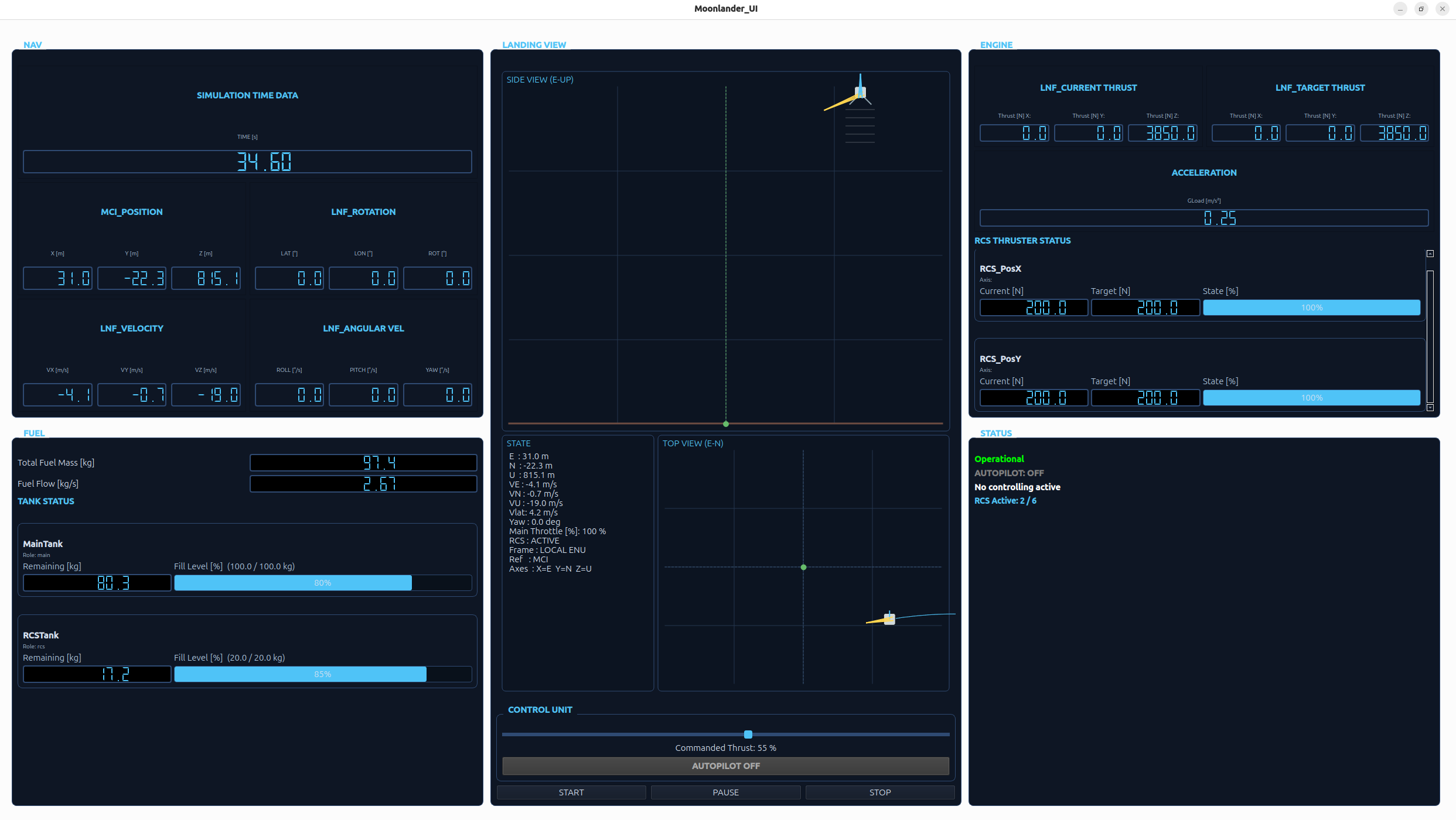
Figure 2 — RCS Telemetry Integration. The cockpit exposes Reaction Control System activity at different abstraction levels. The vehicle visualization indicates active RCS control, the status section reports the number of active thrusters, and the propulsion display provides engine-level information when individual RCS thrusters are firing.
Research-Oriented Cockpit Interface
The cockpit is designed as an engineering interface rather than a purely visual representation of the landing scenario. It exposes selected vehicle, propulsion, navigation, control, and system-state information required to observe simulation behavior during development and validation.
NAV — Navigation State
The navigation section displays the spacecraft's translational state in the local navigation frame. Position and velocity are represented using the ENU convention: East, North, and Up.
The cockpit is being extended to include the rotational component of the 6DoF state, particularly spacecraft angular velocity and attitude information.
FUEL — Propellant and Tank State
Fuel telemetry is represented on a per-tank basis. Each configured tank can expose its remaining propellant mass and relative fill level, allowing spacecraft configurations with separate propulsion resources to be represented consistently.
This provides direct visibility into fuel consumption during main engine and RCS operation and supports later quantitative analysis of controller and propulsion behavior.
LANDING VIEW — Local Situational Visualization
The Landing View provides a lightweight 2.5D representation of the local landing scenario. It combines a side view for vertical motion with a top view for horizontal drift and target-relative movement.
The visualization includes trajectory history, velocity vectors, target reference information, and RCS activity.
The existing Landing View was originally designed around translational motion and cannot fully represent arbitrary three-dimensional spacecraft attitude. Its behavior is therefore being reviewed as part of the cockpit adaptation to the new 6DoF simulation state. Rotational information may be represented through dedicated attitude instrumentation rather than forcing all three rotational degrees of freedom into the existing 2D projection.
ENGINE — Propulsion and RCS Activity
The propulsion section displays main-engine and Reaction Control System telemetry. Main-engine output is presented as current propulsion state, while individual RCS information is exposed when thrusters are active.
RCS telemetry includes engine identity, axis assignment, current thrust, commanded thrust, and actuator state. This makes it possible to trace control commands down to individual propulsion actuators.
The underlying propulsion model now also generates torque from off-center forces. These propulsion-induced torques are aggregated and supplied to the rotational dynamics model as part of the 6DoF simulation pipeline.
CONTROL — Autopilot and Controller Output
The cockpit reports the state of automated guidance and control functions and exposes controller-relevant information during the simulation.
The current demonstration includes adaptive descent guidance and velocity-control functionality. Future control extensions include dedicated RCS-based spacecraft attitude control around the roll, pitch, and yaw axes.
STATUS — Spacecraft and Simulation State
The status section reports discrete spacecraft states such as OPERATIONAL, LANDED, CRASHED, or DESTROYED. These states provide a direct interpretation of the simulation outcome.
The status display also summarizes current RCS activity by comparing active and configured thrusters, providing an immediate overview of propulsion activity without requiring inspection of every individual engine.
6DoF Simulation State
The current backend propagates the complete rigid-body spacecraft state across all six degrees of freedom.
- Three-dimensional position
- Three-dimensional velocity
- Translational acceleration
- Three-axis angular velocity
- Angular acceleration
- Quaternion-based spacecraft attitude
Translational and rotational dynamics are evaluated through separate physical models. Propulsion forces contribute to translational motion, while propulsion-induced torques are processed by the rigid-body rotational dynamics model using spacecraft inertia and Euler's equations of motion.
The cockpit is currently being adapted so that the complete rotational state is exposed to the operator in addition to the existing translational telemetry.
Telemetry Pipeline
Simulation state remains authoritative inside the backend. Selected frontend-facing data is translated into explicit telemetry DTOs by the TelemetryMapper before being forwarded to the cockpit.
This interface prevents the frontend from depending directly on backend domain structures and provides a stable foundation for future telemetry export, alternative frontends, and external communication interfaces.
Engineering and Validation Use Case
The lunar descent demonstration acts as an integrated validation scenario for the broader Spaceflight Dynamics Framework. It provides a repeatable environment in which physical models, propulsion behavior, guidance algorithms, control logic, telemetry mapping, and frontend visualization can be evaluated together.
The current 6DoF core is undergoing systematic physical and numerical verification. This includes validation of force and torque generation, sign conventions, coordinate transformations, rigid-body motion, numerical integration, and quaternion attitude propagation.
Future extensions will add structured telemetry export, controller benchmarking, post-processing workflows, dedicated attitude-control RCS, and additional spacecraft dynamics models.